Sorting:
While working on some DMV scripts, I came up with a lazy way to have a user
definable sort order in the query that seemed like pure genius. I showed it to
the team and they’d never seen anything like it before.
The Situation
Users like to be in control. They want to define custom columns, sort
orders, and basically drag, drop, and pivot chart their way to victory. While
I’m not going to show you how to build custom everything, we can look at a
custom sort order.
Let’s start with a simple query:
|
SELECT
SalesOrderNumber, OrderDate, DueDate,
  ShipDate,
|
|
        PurchaseOrderNumber,
  AccountNumber, SubTotal,
|
|
        TaxAmt,
  Freight, TotalDue
|
|
FROM
Sales.SalesOrderHeader
|
Possible Solutions
Our users want to be able to define a custom sort order on this query. We
could solve this in a few ways:
- Writing several stored
procedures
- Use dynamic SQL to build
an
ORDER
BY
Writing several stored procedures is tedious and error prone – it’s possible
that a bug can be fixed in one of the stored procedures but not the others.
This solution also presents additional surface area for developers and DBAs to
test and maintain. The one advantage that this approach has is that each stored
procedure can be tuned individually. For high performance workloads, this is a
distinct advantage. For everything else, it’s a liability.
We could also use dynamic SQL to build an order clause. I wanted to avoid
this approach because it seemed hacky. After all, it’s just string concatenation.
I also wanted to work in the ability for users to supply a top parameter
without having to use the
TOP operator.
The First Attempt
My first attempt at rocket science looked like this:
|
DECLARE
@SortOrder VARCHAR(50) = 'OrderDate';
|
|
|
|
SELECT
rn,
|
|
SalesOrderNumber,
|
|
ShipDate,
|
|
PurchaseOrderNumber,
|
|
SELECT
CASE @SortOrder WHEN 'OrderDate'
|
|
THEN
ROW_NUMBER() OVER
|
|
(ORDER
BY OrderDate DESC)
|
|
WHEN
'DueDate'
|
|
THEN
ROW_NUMBER() OVER
|
|
(ORDER
BY DueDate DESC)
|
|
WHEN
'ShipDate'
|
|
THEN
ROW_NUMBER() OVER
|
|
(ORDER
BY ShipDate DESC)
|
|
END
AS rn,
|
|
SalesOrderNumber,
|
|
OrderDate,
|
|
PurchaseOrderNumber,
|
|
AccountNumber,
|
|
|
|
FROM
Sales.SalesOrderHeader
|
Why do it this way? There are a few tricks with paging that you can perform
using
ROW_NUMBER() that
I find to be more readable than using
OFFSET and
FETCH in SQL Server 2012.
Plus
ROW_NUMBER() tricks
don’t require SQL Server 2012.
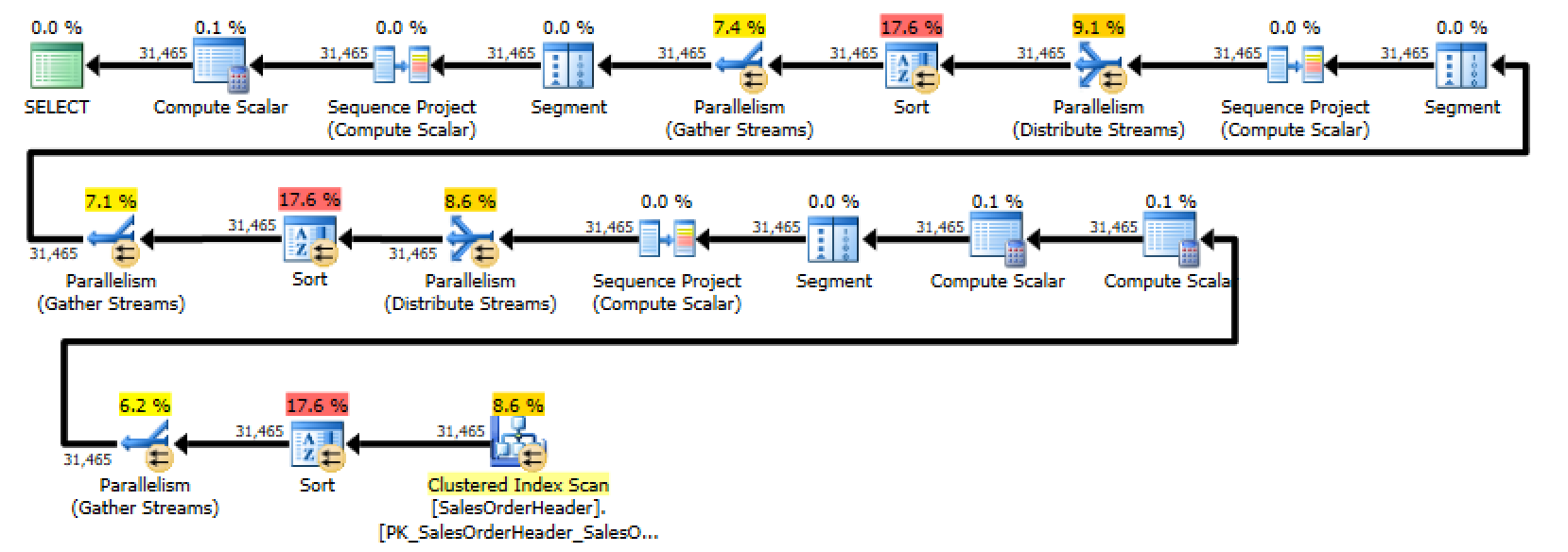
Unfortunately, when I looked at the execution plan for this query, I
discovered that SQL Server was performing three separate sorts – one for each
of the case statements. You could generously describe this as “less than
optimal”.
Look at all those pretty sorts!
Even though it seems like SQL Server should optimize out the
CASE statement, the obvious thing
doesn’t happen. SQL Server has to compute the
ROW_NUMBER() for every row in the
result set and then evaluate the condition in order to determine which row to
return – you can even see this in the first execution plan. The second to last
node in the plan is a Compute Scalar that determines which
ROW_NUMBER() to return.
I had to dig in and figure out a better way for users get a custom sort
option.
Moving the CASE to the ORDER
BY
My next attempt moved the custom sort down to the
ORDER BY clause:
|
DECLARE
@SortOrder VARCHAR(50) = 'OrderDate';
|
|
|
|
SELECT
SalesOrderNumber,
|
|
OrderDate,
|
|
PurchaseOrderNumber,
|
|
AccountNumber,
|
|
FROM
Sales.SalesOrderHeader
|
|
ORDER BY CASE
@SortOrder WHEN 'OrderDate'
|
|
THEN
ROW_NUMBER() OVER
|
|
(ORDER
BY OrderDate DESC)
|
|
WHEN
'DueDate'
|
|
THEN
ROW_NUMBER() OVER
|
|
(ORDER
BY DueDate DESC)
|
|
WHEN
'ShipDate'
|
|
THEN
ROW_NUMBER() OVER
|
|
(ORDER
BY ShipDate DESC)
|
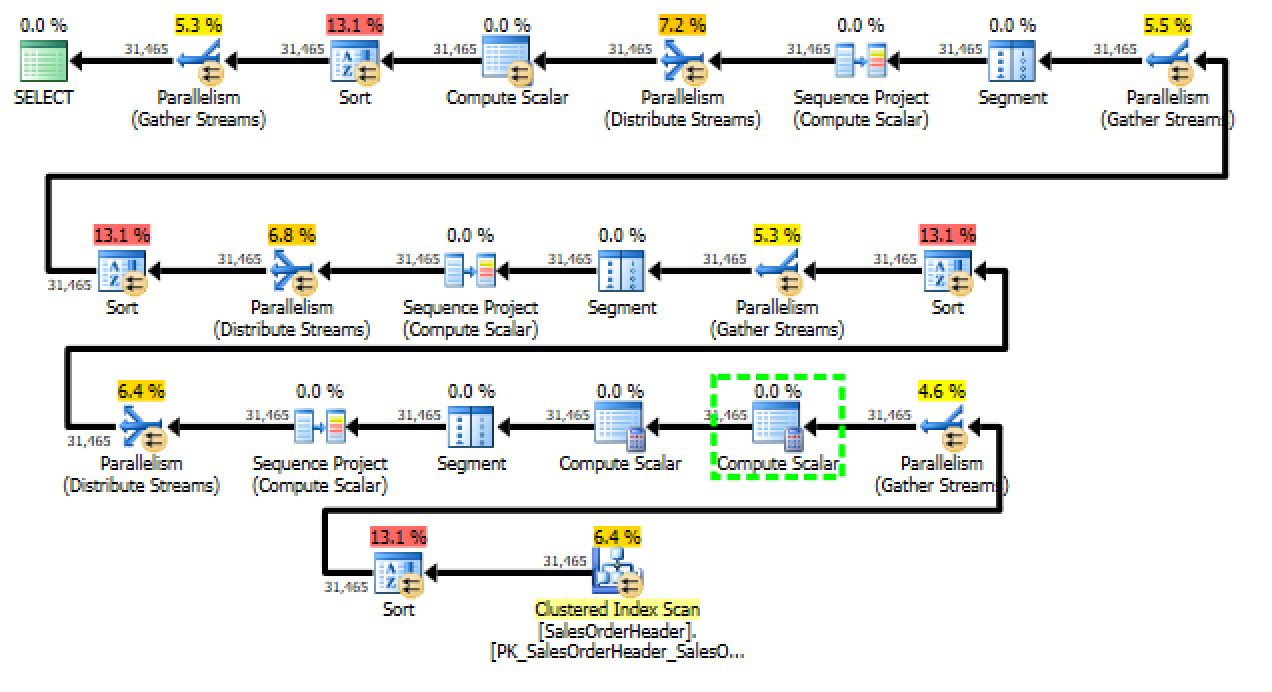
This ended up performing worse than the first attempt (query cost of 8.277
compared to the original query’s cost of 6.1622). The new query adds a fourth
sort operator. Not only is the query sorting once for each of the possible
dates, it’s then performing an additional sort on the output of the
ROW_NUMBER() operator in the
ORDER BY. This clearly isn’t going to
work.
-50% improvement is still improvement, right?
Getting Rid of ROW_NUMBER()
It seems like
ROW_NUMBER() really
isn’t necessary for our scenario. After all – I only added it as a trick if so
I could potentially add paging further down the road. Let’s see what happens if
we remove it from the query:
|
DECLARE
@SortOrder VARCHAR(50) = 'OrderDate';
|
|
|
|
SELECT
SalesOrderNumber,
|
|
OrderDate,
|
|
PurchaseOrderNumber,
|
|
AccountNumber,
|
|
FROM
Sales.SalesOrderHeader
|
|
ORDER BY CASE
@SortOrder WHEN 'OrderDate' THEN OrderDate
|
|
WHEN
'DueDate' THEN DueDate
|
|
WHEN
'ShipDate' THEN ShipDate
|
Right away, it’s easy to see that the query is a lot simpler. Just look at
the execution plan:
A contender appears!
This new form of the query is a winner: the plan is vastly simpler. Even
though there’s a massive sort operation going on, the query is still much
cheaper – the over all cost is right around 2 – it’s more than three times
cheaper than the first plan that we started with.
There’s one downside to this approach – we’ve lost the ability to page
results unless we either add back in the ROW_NUMBER() or else use
FETCH and
OFFSET.
Bonus Round: Back to ROW_NUMBER
While using my brother as a
rubber
duck, he suggested one last permutation – combine the
ORDER BY technique with the
ROW_NUMBER() technique:
|
DECLARE
@SortOrder VARCHAR(50) = 'OrderDate';
|
|
|
|
SELECT
rn,
|
|
SalesOrderNumber,
|
|
ShipDate,
|
|
PurchaseOrderNumber,
|
|
SELECT
ROW_NUMBER() OVER (ORDER BY CASE
@SortOrder
|
|
WHEN
'OrderDate' THEN OrderDate
|
|
WHEN
'DueDate' THEN DueDate
|
|
WHEN
'ShipDate' THEN ShipDate
|
|
SalesOrderNumber,
|
|
OrderDate,
|
|
PurchaseOrderNumber,
|
|
AccountNumber,
|
|
FROM
Sales.SalesOrderHeader
|
|
) AS x
|
This ended up being almost as fast as the
ORDER BY approach; this query’s cost is only 0.00314
higher than the
ORDER BY.
I don’t know about you, but I would classify that as “pretty much the same”.
The advantage of this approach is that we get to keep the
ROW_NUMBER() for paging purposes,
there is only one sort, and the code is still relatively simple for maintenance
and development purposes.
Check out the plan!
Victory is ours!
What Did We Learn?
I learned that trying to be smarter than SQL Server can lead to pretty
terrible performance. It’s important to remember that the optimizer reserves
the right to re-write. In the first and second case, SQL Server did me a favor
by re-writing the query. Our third case is fairly obvious. The fourth example
is somewhat surprising – by shifting around the location of the
CASE, we’re able to eliminate multiple
sorts and gain the benefit of using
ROW_NUMBER().



No comments:
Post a Comment